How to Retain SEO Clients: 7 Things to Do Before They Email to Cancel
What I’d put in place at any SEO agency to keep clients longer, from the first month to the day an account turns red.

Tim, Founder of OthFlow
Published Last updated 12 min read
On this page
- How do you retain SEO clients?
- Why SEO clients leave
- 1. Give every new client a first month with no guesswork
- 2. Show the work before the client has to ask
- 3. Keep approvals and handoffs moving
- 4. Keep account managers at about six clients
- 5. Ask every client how they feel, every week
- 6. Score every account so the quiet ones can’t hide
- 7. Have a plan for the day an account turns red
- What’s a good client retention rate for an SEO agency?
- How OthFlow helps you keep SEO clients
- Where to start this week
- About the author
I’ve spent seven years in SEO agencies, mostly as a strategist in client-facing roles, at agencies with more than 50 clients on retainer. A big part of my job was making sure nothing slipped through the cracks, and one message kept coming back: “How are we with this?”
That question tells you a client can’t see the work. Leave it long enough and they start wondering what they’re paying for, and when the cancellation email lands, the agency is often the last to understand why.
Below are the seven things I’d put in place at any SEO agency, from a client’s first month to the day an account turns red. I’m also the founder of OthFlow, so I’ll show you how we handle each one in the product, including Client Pulse, our weekly happiness check. You can copy nearly all of it with a form and a spreadsheet if you don’t use OthFlow.
How do you retain SEO clients?
You retain SEO clients by making the work easy to see, keeping it moving, and finding out how each client feels long before renewal. That means a clear first month, a live view of progress, fast approvals, sensible account loads, a weekly check-in, and a score that flags at-risk accounts early.
The rest of this guide takes those one at a time. First, it helps to know why clients leave, because agencies often get that wrong.
Why SEO clients leave
Agencies tend to blame the budget when a client leaves, and clients tell a different story. In Setup and the CMO Institute’s 2025 Marketing Relationship Survey, clients’ top reasons for ending an agency relationship were dissatisfaction with delivery (61%) and value (61%), while budget cuts came in at 39%. Agencies in the same survey put budget cuts first at 75%, and only 18% pointed to delivery.
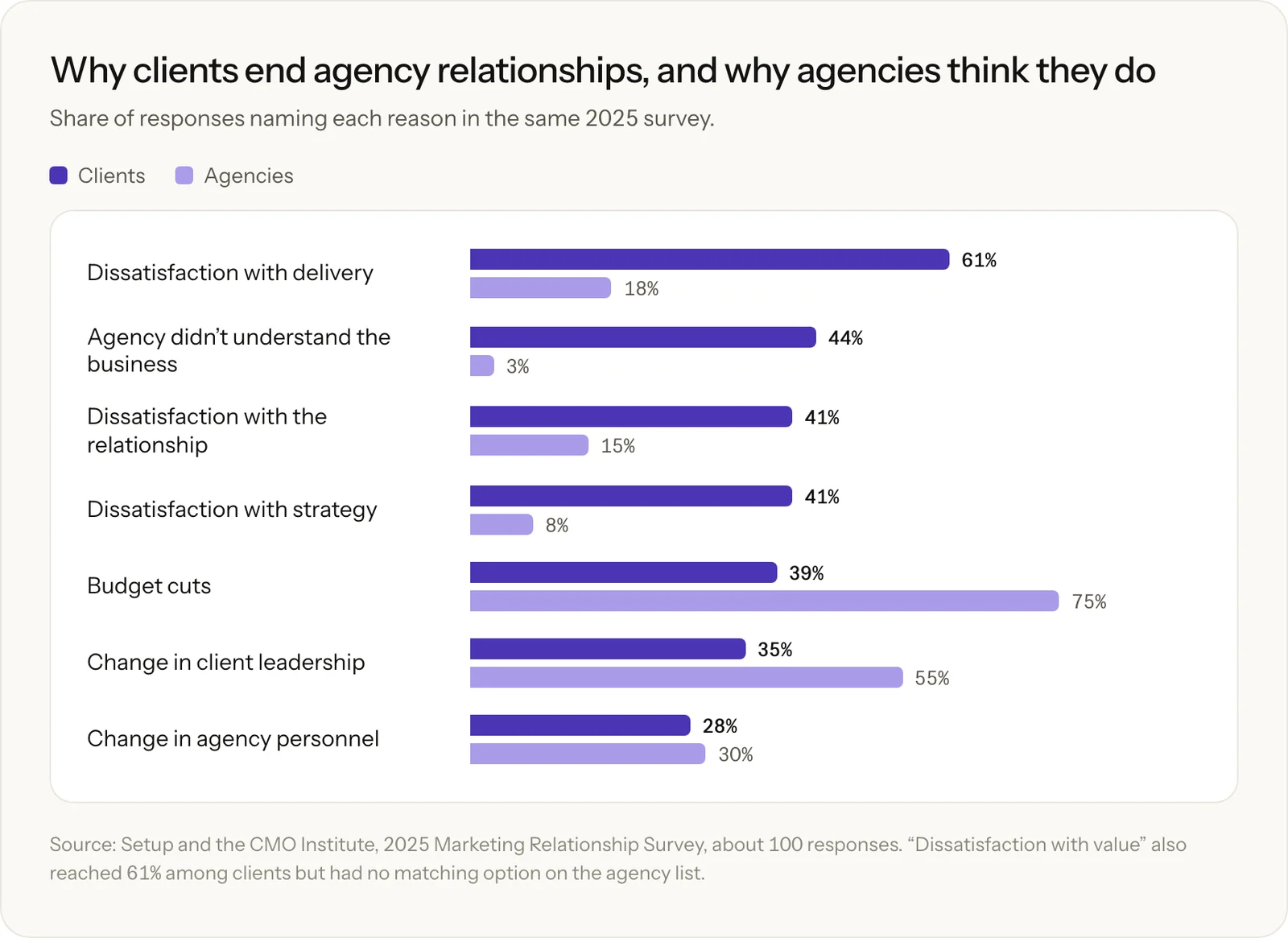
The sample is small, at around 100 responses, and the client brands it names are large ones, so I’d read those numbers as a direction rather than an exact measure. SEO agencies lean the same way when you ask them directly. In Sitechecker’s survey of 73 SEO agencies, 27.4% said clients stop SEO to cut costs, and 5.5% said clients leave over poor delivery.
My read is that “budget” is often the polite reason. When finance asks your contact what the SEO retainer is doing, your contact needs an answer ready, and they can’t give one if they can’t see the work.
You also have less time than you might think. In CallRail’s 2026 agency report, 57% of agencies said their typical client relationship lasts 12 to 24 months, and only 3% said 36 months or longer. That survey covers 100 agency professionals, mostly at agencies with 100 or more staff, so smaller shops may look different. Either way, the first year carries a lot of weight.
1. Give every new client a first month with no guesswork
“When clients come in, they’re usually lost. They don’t know where to go, and they don’t know what’s required from them until we explicitly tell them. That shouldn’t be so.”
A new client has just signed and is waiting to see what happens next. If they have to ask who does what, or what you need from them, you’ve made their first month harder than it should be.
I’d fix that with two things on day one. One is an onboarding checklist split by who owns each step, so the client can see what’s theirs. The other is a simple roadmap that shows what’s coming and when they can expect it.
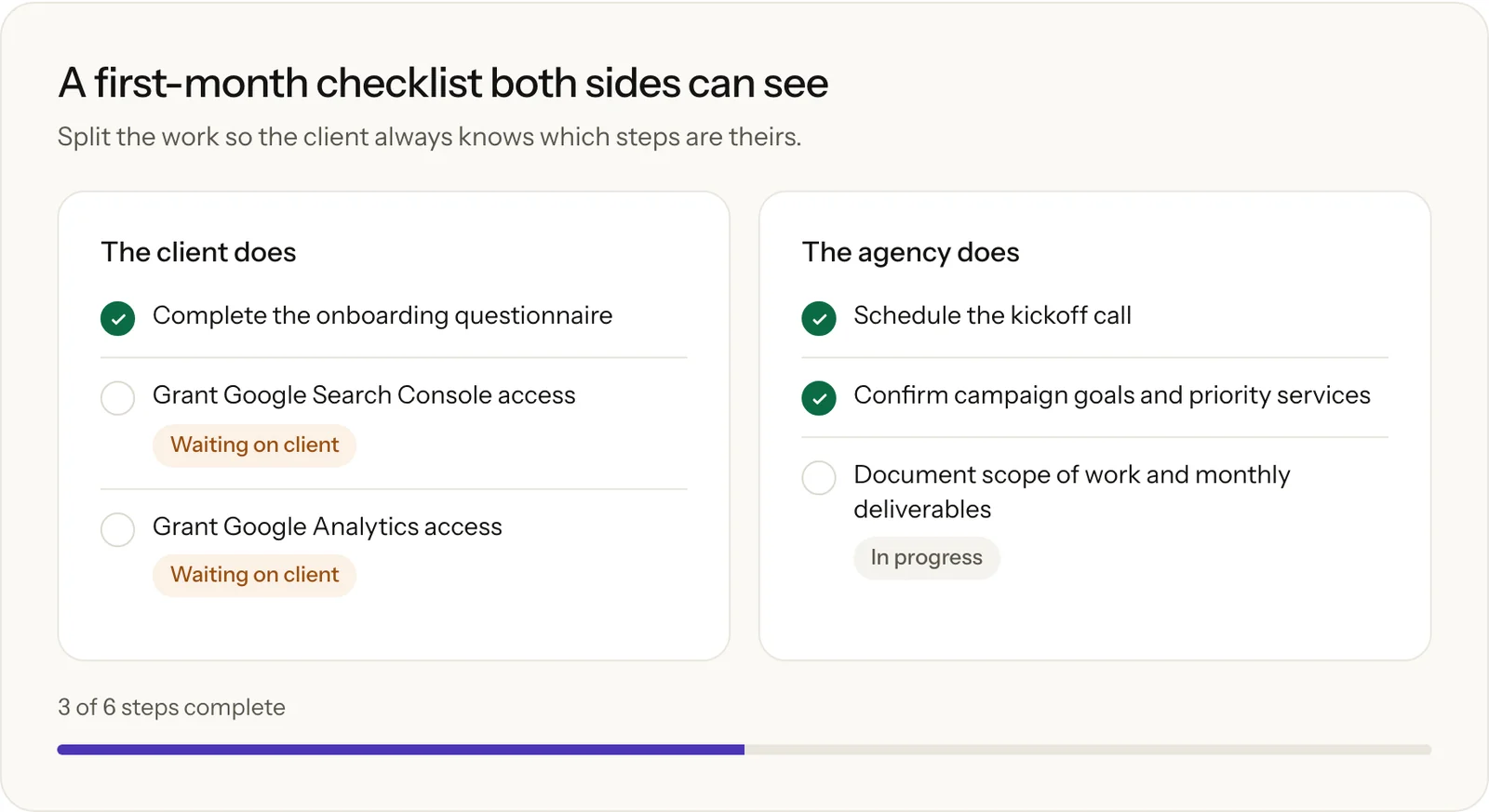
Use the roadmap to set expectations on results too. SEO takes time, and SEOmonitor’s retention guide calls unrealistic expectations the top cause of client churn, so agree on what progress looks like in the first six months before anyone starts watching rankings.
In OthFlow, adding a client takes three steps. It then creates their onboarding checklist, three kickoff tasks and a private portal link, and the client’s steps show up in their portal for them to tick off. The checklist above is our default, and you can build your own templates for each type of SEO client.
2. Show the work before the client has to ask
When the only record of the work is a Sheet, nobody can say where something stands without chasing the team first. Every one of those emails eats into an account manager’s day, and a client who keeps having to ask starts to feel ignored.
Good rankings won’t always cover for this. One agency owner on r/agency described a client who nearly quit after six months of rising rankings, because the work had always felt like a mystery to them.
Reporting helps, and the gap there is wide. In the CallRail report, only 6% of agencies with the shortest client lifespans (up to 12 months) offered analytics and reporting, compared with 48% overall. That doesn’t prove reporting keeps clients, but I wouldn’t want to be in that 6%.
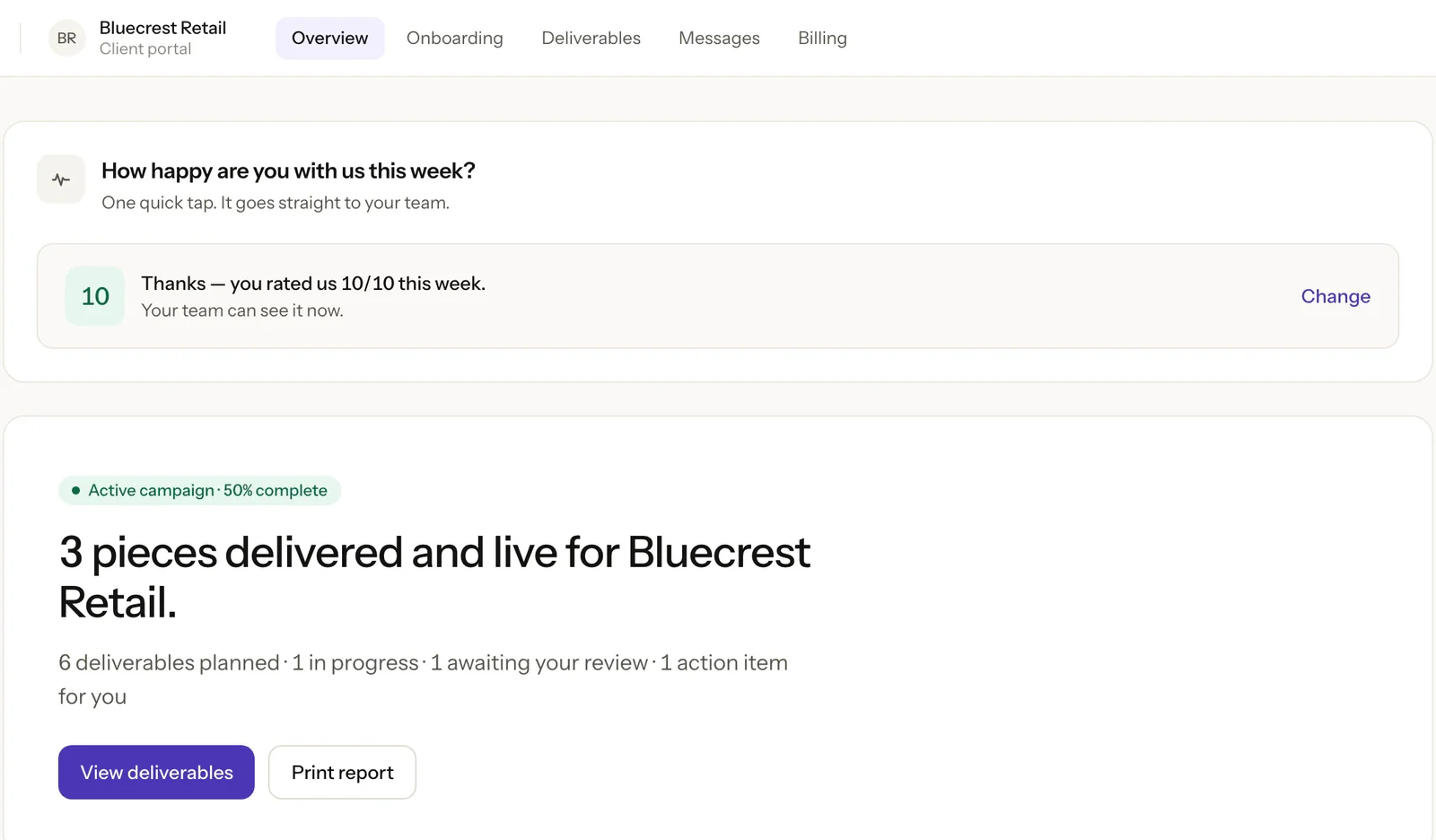
A monthly report only covers the past, though. Clients also want to know what’s happening now, so give them one page that answers three questions: what’s done, what’s in progress, and what’s waiting on them.
That’s the job of the OthFlow client portal. Every client gets a private page, opened from a secure link with no login, that shows their progress, deliverables, anything waiting for their review, messages and invoices. You choose which sections each client sees.
3. Keep approvals and handoffs moving
A draft sits in a client’s inbox for a week, and everything scheduled behind it slips. Then the client says yes, and the approved work waits until someone notices and assigns the next step. Both delays look the same to the client, because each one leaves them with less to show for the month.
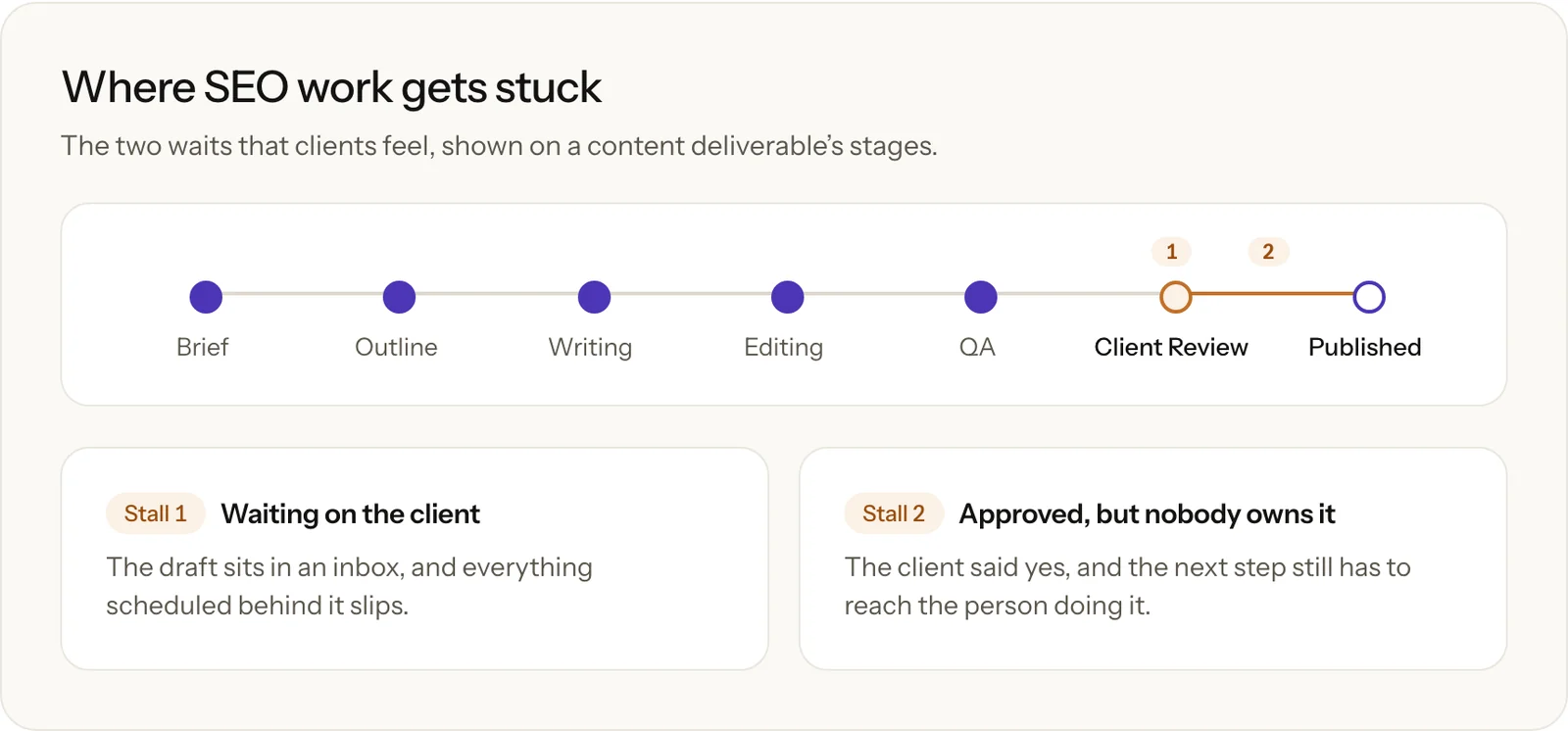
Two habits help. Agree on a review window at kickoff, so approvals have a deadline from the start, and give every deliverable a named owner at every stage, so approved work always has somewhere to go.
In OthFlow, clients approve work or request changes in the portal, right where they see it. Any active deliverable without an owner counts against that client’s health score, so unowned work gets noticed early. OthFlow’s retainer workflow also plans each client’s month in one place, and a missing plan shows up on your dashboard.
4. Keep account managers at about six clients
“One account manager can handle about six clients before things start to break.”
That’s my rule of thumb from agency work, and it’ll shift with retainer size. Past that point, deadlines, approvals and promises start living in someone’s head. At an agency with 50 clients, six per person means eight or nine account managers.
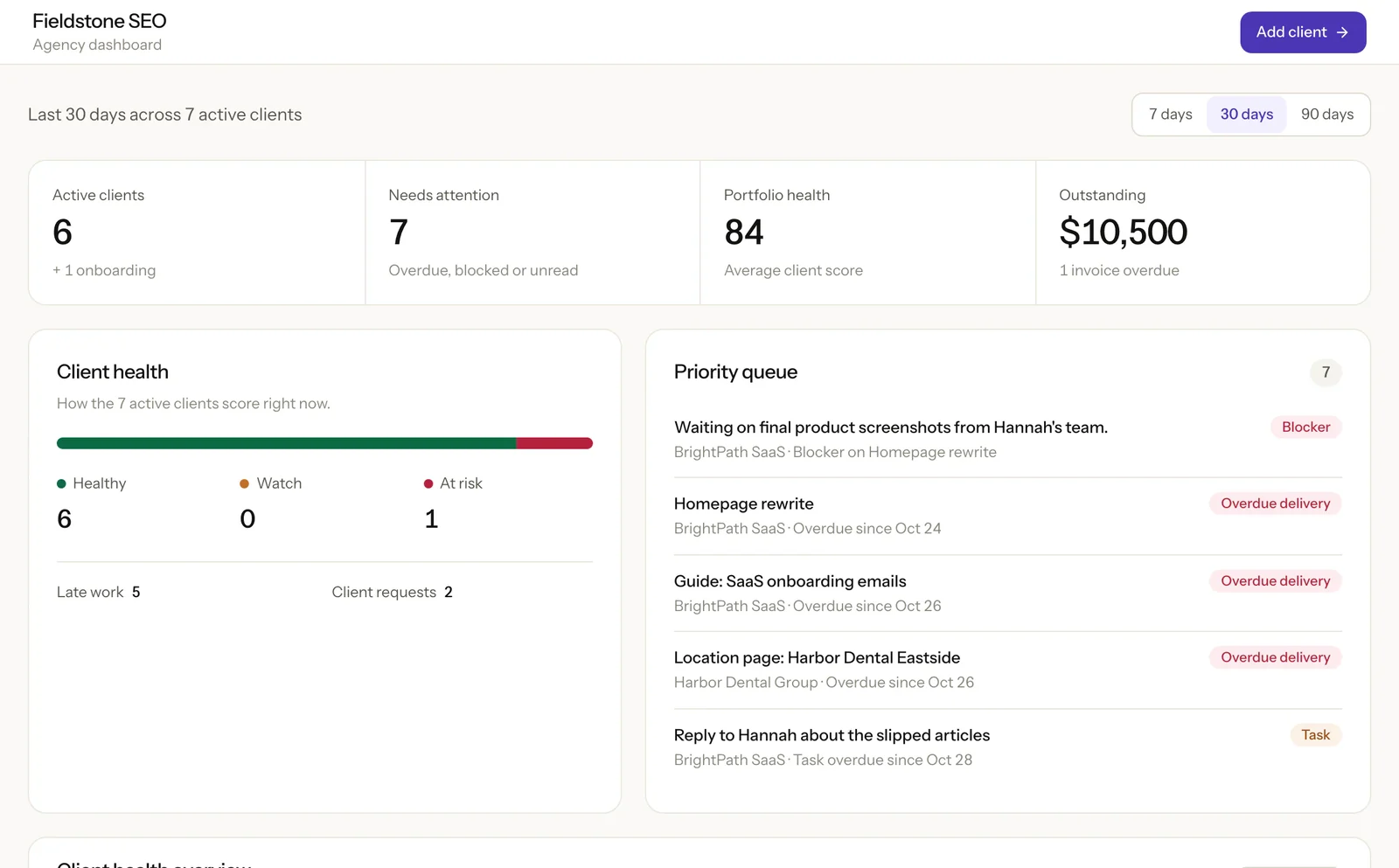
If you can’t hire that many, your software has to hold the context instead, including who owns each deliverable, what’s late and what’s blocked. OthFlow’s dashboard puts this in one priority queue across every client, with blockers at the top, followed by overdue deliverables, overdue tasks, overdue invoices and clients with no plan for the month.
If you’re still running all this from a generic board, compare SEO project management tools on what clients can see and how approvals work before you add another account manager to it.
5. Ask every client how they feel, every week
Quarterly reviews come too late. If a client had a rough month in July, you don’t want to hear about it at the end of September. So ask more often, and keep the ask small enough that a busy client will answer.
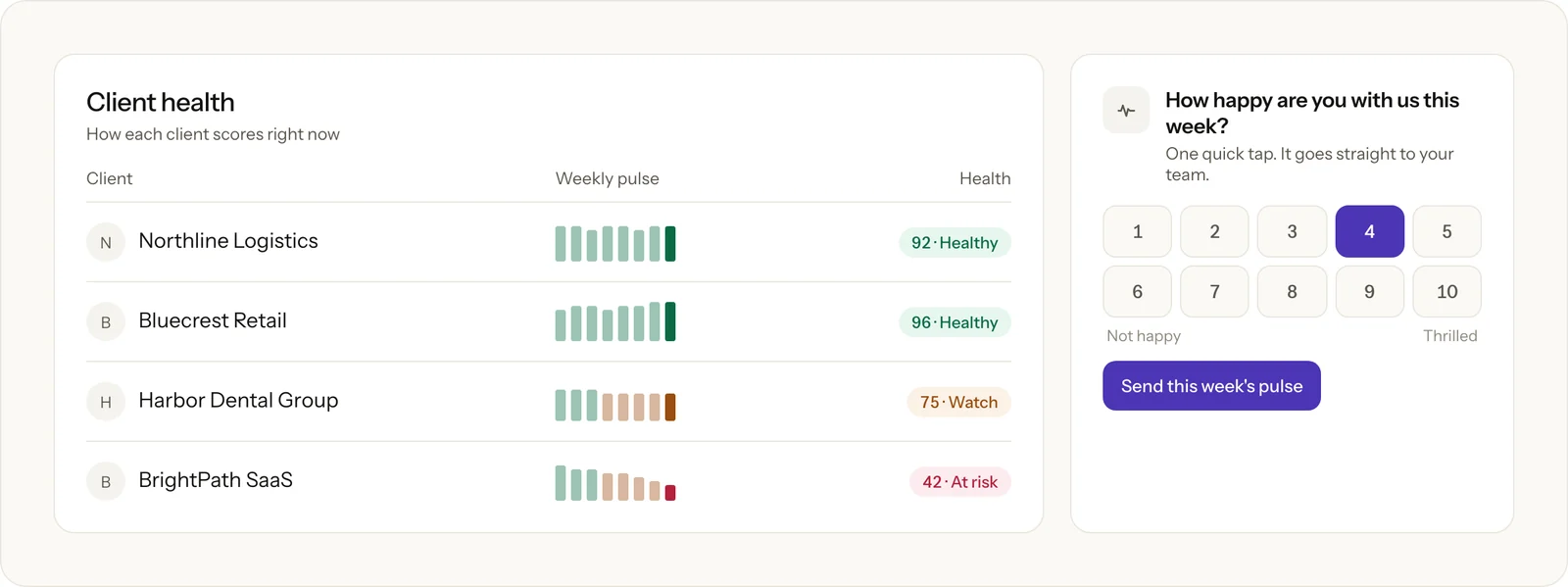
That’s why we built Client Pulse into OthFlow. Each week, the client’s portal asks one question: “How happy are you with us this week?” They tap a number from 1 to 10 and can add a comment if they want to. The score goes straight onto their client record, next to their past scores, so your team can see the trend.
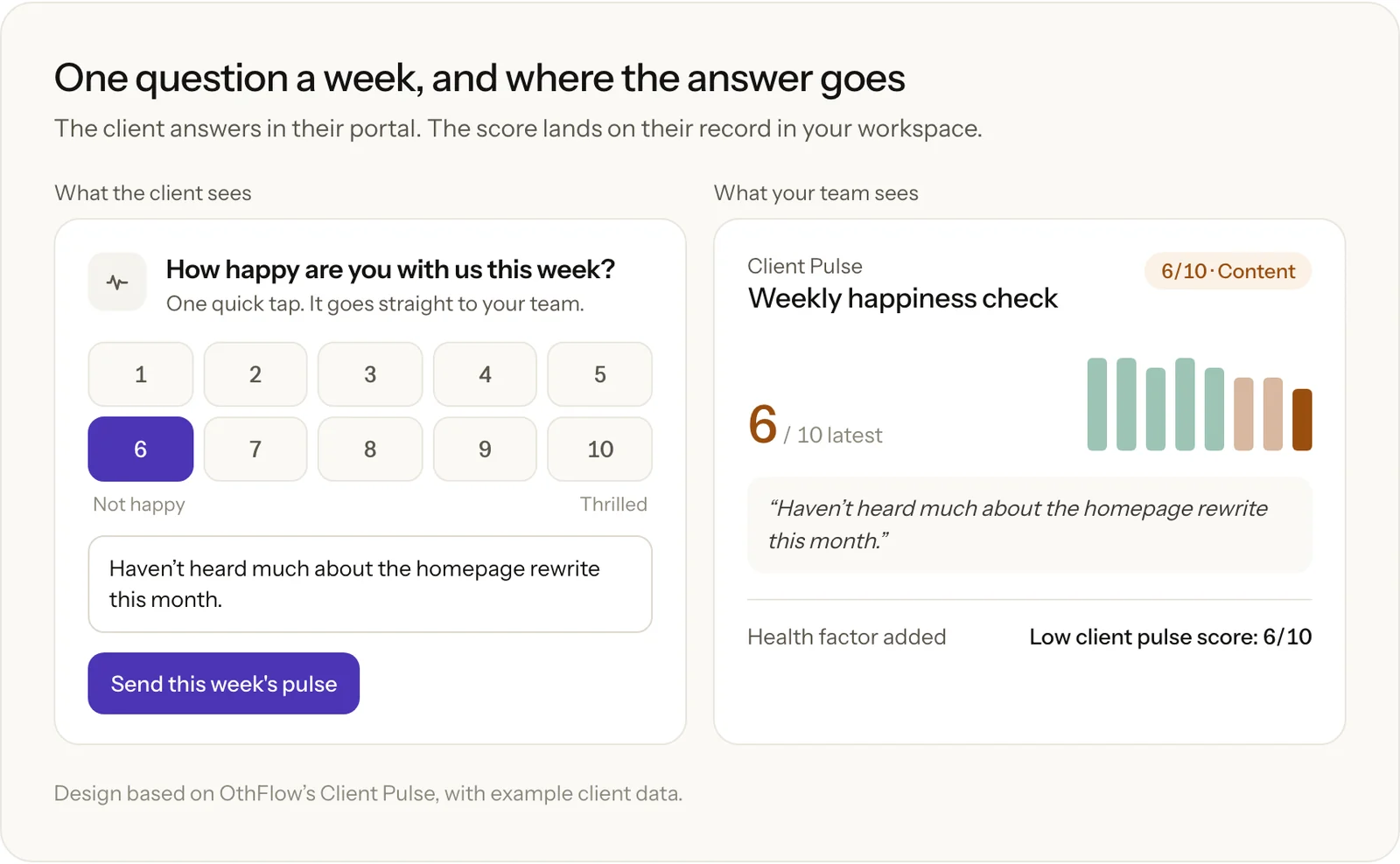
Watch the trend as closely as the number. A client who always gives you a 7 is in a different place from a client who gave you 9s last month.
I’d respond differently depending on where the score lands.
| Score | What OthFlow shows | What I’d do |
|---|---|---|
| 8–10 | Happy or Delighted, in green | Thank them and note what went well. After a good run, ask for a referral or a case study. |
| 5–7 | Content or Lukewarm, in amber | Reply the same day. Ask what would make next week better, and fix the small thing fast. |
| 1–4 | Lukewarm or Unhappy, in red | Call them within a day, and follow the plan in step 7. |
Scroll sideways to see every column.
You should know two limits. The Pulse lives in the portal and OthFlow doesn’t send clients a weekly reminder email, so put the portal link in your weekly update. And a client who skips the question won’t lower their score, so watch for silence yourself. If you don’t use OthFlow, a one-question form in your weekly email gets you most of the way there.
6. Score every account so the quiet ones can’t hide
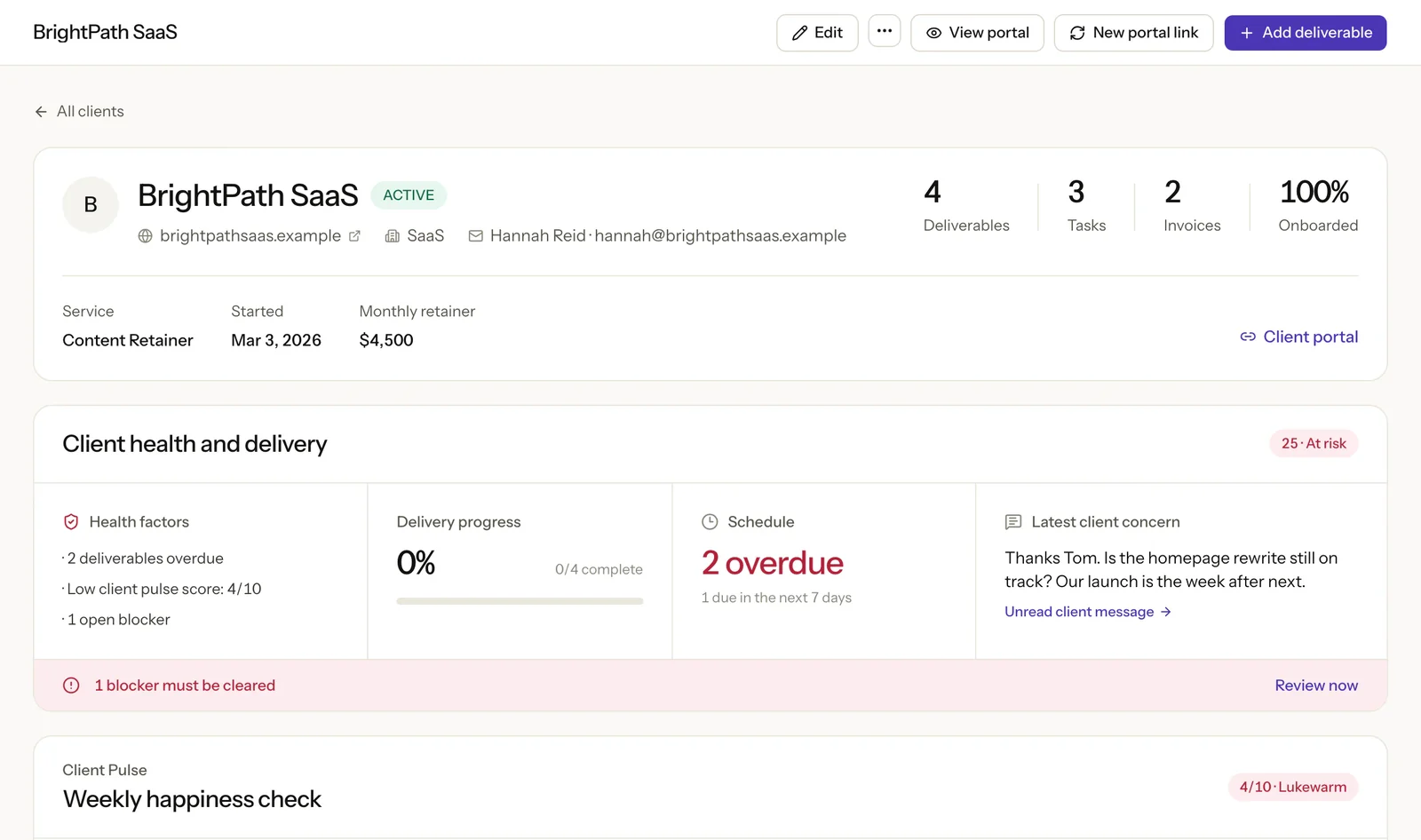
A client’s own rating only tells you part of the story, so pair it with what your delivery data says. Every client in OthFlow gets a Client Health score out of 100. They start at 100 and lose points for warning signs, and the reasons sit next to the score so you know what to fix. Scores of 80 and above read Healthy, 60 to 79 read Watch, and anything below 60 reads At risk.
You’re welcome to rebuild the whole model in a spreadsheet:
| Warning sign | Points lost | Most it can cost |
|---|---|---|
| Deliverable overdue | 12 each | 30 |
| Open blocker | 12 each | 24 |
| Pulse score of 6 or below | 6 at a score of 6, plus 6 for each point lower | 30 |
| No delivery activity in 30 days | 20 | 20 |
| Overdue invoice | 10 each | 20 |
| Overdue task | 7 each | 14 |
| Open client request | 6 each | 12 |
| Unread client message | 4 each | 8 |
| Active deliverable with no owner | 3 each | 9 |
| Onboarding not finished | 6 | 6 |
| No account owner | 5 | 5 |
| No SEO plan this month | 5 | 5 |
Scroll sideways to see every column.
These weights are our judgment rather than the result of a study, so adjust them to fit your agency. Pulse scores stop counting after 28 days, so one bad week doesn’t follow a client around forever.
With nothing late and no complaints, a client would score a perfect 100 if we only counted problems. A month with nothing delivered is exactly when a client starts asking what they’re paying for, so that sign costs 20 points on its own. In the example below, the quiet account has no complaints at all and still lands on Watch.
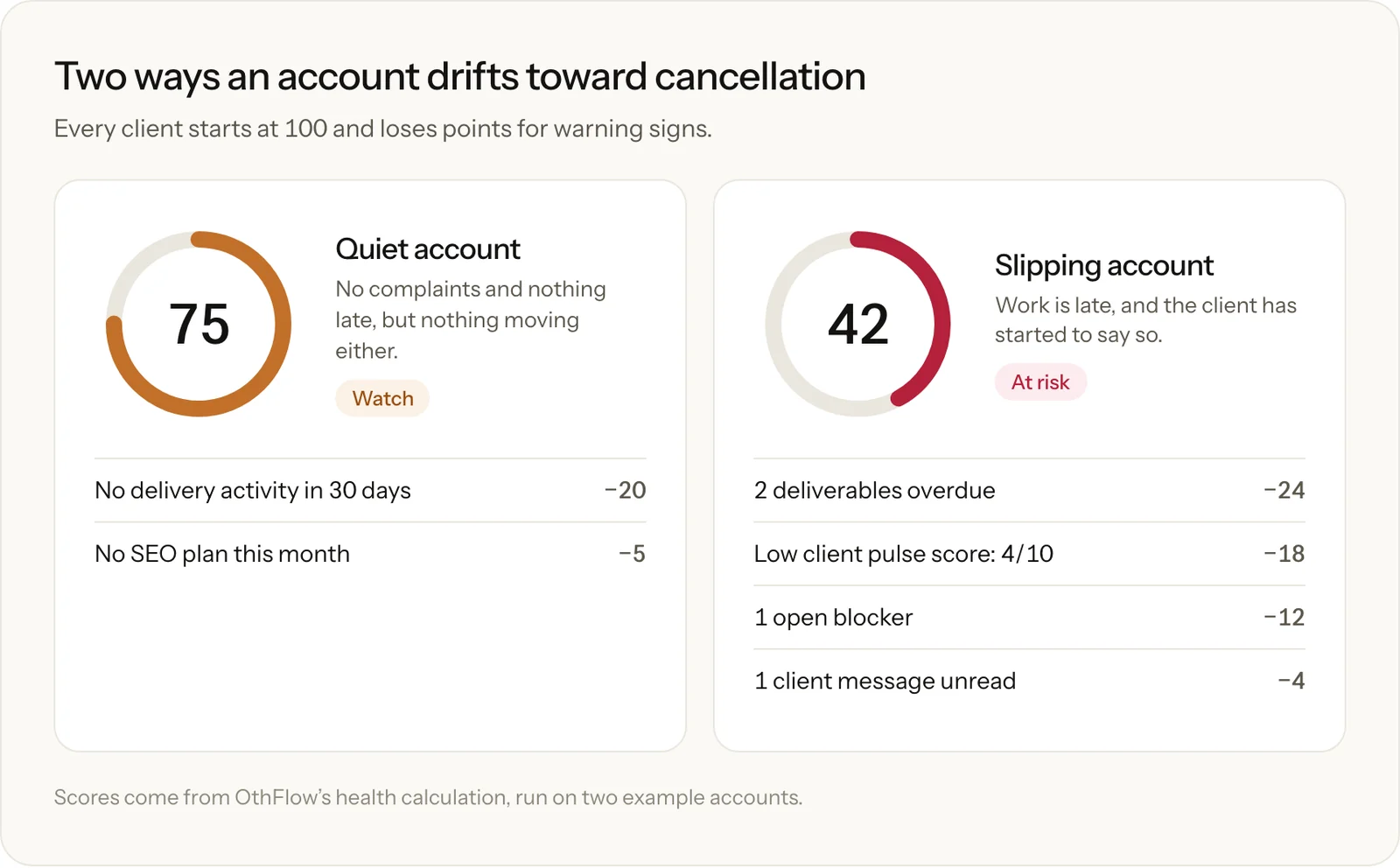
One thing to watch for is that a low Pulse score won’t turn an account red by itself. A 3/10 on an otherwise clean account scores 76 and reads Watch, and a 4/10 still reads Healthy at 82. Treat any Pulse score of 4 or below as an alarm of its own, whatever the health band says.
7. Have a plan for the day an account turns red
A low score only helps if someone knows what to do next, so agree on the steps before you need them.
- Call within a day. Skip the email, and make sure the person calling can make decisions.
- Ask what changed before you defend the work. It could be delivery, results or value. It could also be something on their side, such as a new boss or a budget review.
- Agree on one fix with a date and an owner. Put it where the client can see it, so they can watch it get done.
- Check the next week’s score. If it’s up, tell the team what helped. If it isn’t, bring in the agency owner.
- If they still leave, ask why. Write the reason down in their words, because a log of those reasons will show you patterns your exit notes won’t.
When a client does go, archive them in OthFlow. Their portal switches off, their record and history stay, and you can restore everything if they come back.
What’s a good client retention rate for an SEO agency?
A good annual client retention rate for an SEO agency is roughly 80% to 90%. SEOmonitor’s benchmarks put 75% to 90% at good and 90% or more at excellent, and Predictable Profits’ benchmark reports 78% for seven-figure agencies and 92% for eight-figure agencies. Neither publishes its full method, so use them as rough guides.
To work out your own rate, subtract the new clients you won this year from your year-end total, divide by your starting total, and multiply by 100. An agency that starts with 20 clients, wins 6 and ends with 22 has an 80% retention rate. Track revenue next to it, because a client who halves their retainer still counts as retained.
How OthFlow helps you keep SEO clients
We built OthFlow for SEO and content agencies that run monthly retainers, and retention runs through the whole product.
| Where clients slip away | What OthFlow does |
|---|---|
| New clients don’t know what’s next | Sets up an onboarding checklist, kickoff tasks and a portal link when you add a client |
| Clients can’t see the work | Gives each client a private portal with no login |
| Approvals stall | Lets clients approve or request changes next to the work |
| A month passes with nothing to show | Flags clients with no SEO plan for the month or no delivery in 30 days |
| You don’t know how a client feels | Asks every week with Client Pulse |
| At-risk accounts hide in the pile | Scores every client with Client Health and ranks what needs attention |
| Late invoices sit apart from the work | Keeps invoices on the client record, so overdue payments count toward health |
Scroll sideways to see every column.
OthFlow covers SEO and content retainers only, so paid media or web design work needs another tool. Pricing is per active client rather than per seat, at $79 a month for up to 5 clients, $179 for up to 15 and $349 for up to 40, as of November 2026. Every plan includes every feature and unlimited team members. There’s no free plan or self-serve trial, so you start with a demo.
Where to start this week
Open your client list and pick the three accounts you’ve heard from least this month. Send each one a short note asking how happy they are with you, from 1 to 10. Call anyone who answers 6 or below, and call anyone who doesn’t answer at all.
If you’re running more than a handful of retainers and want to see which clients need attention before they email to cancel, book an OthFlow demo.

Written by
Founder of OthFlow
Tim is the founder of OthFlow. He’s worked in SEO for seven years and has helped more than 50 businesses grow their pipeline and hit their goals through SEO and AI search.
Connect on LinkedIn