9 Best ClickUp Alternatives for SEO Agencies (2026)
Looking for ClickUp alternatives? We compared 9 tools for SEO agency work, from setup time and client approvals to retainers and pricing.

Tim, Founder of OthFlow
Published Last updated 20 min read
9 ClickUp alternatives, compared for SEO agencies
Setup · client sign-off · monthly work · cost
- 01OthFlowSEO agencies that want retainers set up from day one
- 02AsanaAgencies that want a cleaner task tool with a client portal
- 03Teamwork.comAgencies that bill hours and run retainer budgets
- 04BasecampSmall agencies with a handful of clients
- 05ProductiveAgencies that run on hours, budgets and invoices
- 06monday.comAgencies that want to start from templates and boards
- 07NotionSmall agencies that live in briefs, SOPs and wikis
- 08WrikeAgencies with formal client approval rounds
- 09TrelloTeams of two or three that want to spend almost nothing
On this page
- Quick summary
- ClickUp is flexible, so the setup is on you
- Why agencies leave ClickUp
- Who should stay on ClickUp
- How we chose these ClickUp alternatives
- ClickUp alternatives compared
- 1. OthFlow
- 2. Asana
- 3. Teamwork.com
- 4. Basecamp
- 5. Productive
- 6. monday.com
- 7. Notion
- 8. Wrike
- 9. Trello
- How to choose a ClickUp alternative
- Before you switch
- FAQs
- Which ClickUp alternative should you pick?
- About the author
Quick summary
The best ClickUp alternative for an SEO agency is already set up for clients and monthly work, so there’s less to configure. OthFlow (our product) is built around SEO retainers, and Asana is the easiest general tool to move to. Teamwork.com and Productive suit agencies that bill by the hour, and Basecamp and Trello have the least to set up.
Key takeaways:
- ClickUp’s own help center says its learning curve is steeper than Asana’s.
- Dashboards, proofing and timesheets start on ClickUp Business, at $17 per user a month billed yearly, and your whole Workspace upgrades together.
- Clients don’t take a paid seat in Asana, Teamwork.com, Productive or Notion.
- Teamwork.com is the only tool here that documents a direct ClickUp importer.
- If you bill by the hour, OthFlow won’t fit, because it doesn’t track time. But if you run SEO retainers and want preset deliverables, monthly plans your clients approve and a client portal with no login, OthFlow is built for that.
ClickUp is flexible, so the setup is on you
Before your first client goes into ClickUp, someone on your team has to design the workspace. Why? ClickUp is made to fit any team, so it doesn’t come with retainers, deliverable types or a client sign-off step. You build those yourself out of Spaces, Folders, Lists, statuses and custom fields.
ClickUp is open about what that flexibility costs. In its own comparison with Asana, ClickUp’s help center says “the initial learning curve is steeper.” It also says Asana is “cleaner to set up, easier to onboard.” For an agency, that learning curve comes back every time a new writer, link builder or client joins. So which tools fit SEO client work better, and who should stay?
Why agencies leave ClickUp
ClickUp calls itself “the everything app for work.” But an agency has to build, maintain and pay for a lot of it before it works for clients. Going only by ClickUp’s own pages, four reasons stand out.
You build and maintain the agency structure
ClickUp organizes work in seven layers, from Workspace, Space, Folder, Subfolder and List down to task and subtask. ClickUp’s guide to agency management suggests one Space for client work, with a Folder for each large client. Smaller clients share a Folder and get one List each. It also suggests Folders for your CRM, scopes of work, billing and client feedback.
Even features like custom fields and time tracking are ClickApps that only owners and admins can switch on. Custom roles, which control what each person sees, are only on Enterprise and Max. So keeping the workspace tidy becomes somebody’s job.
Client reports and approvals take workarounds
Dashboards can’t be shared with people outside your Workspace, so a client only sees one if you invite them as a guest. You can schedule dashboard reports to outside people, but only 40 times on Core and Business, and that count doesn’t reset.
There’s no approval step or client portal either. ClickUp’s own advice is to assign a comment to your client, who resolves it to approve or replies with changes.
The agency features sit on Business
On Core, dashboards, proofing and billable time are only trials. To get timesheets, unlimited proofing and advanced dashboards, you need Business, at $17 per user a month billed yearly. And because your whole Workspace upgrades at once, every member pays the Business price, even people who never open a dashboard.
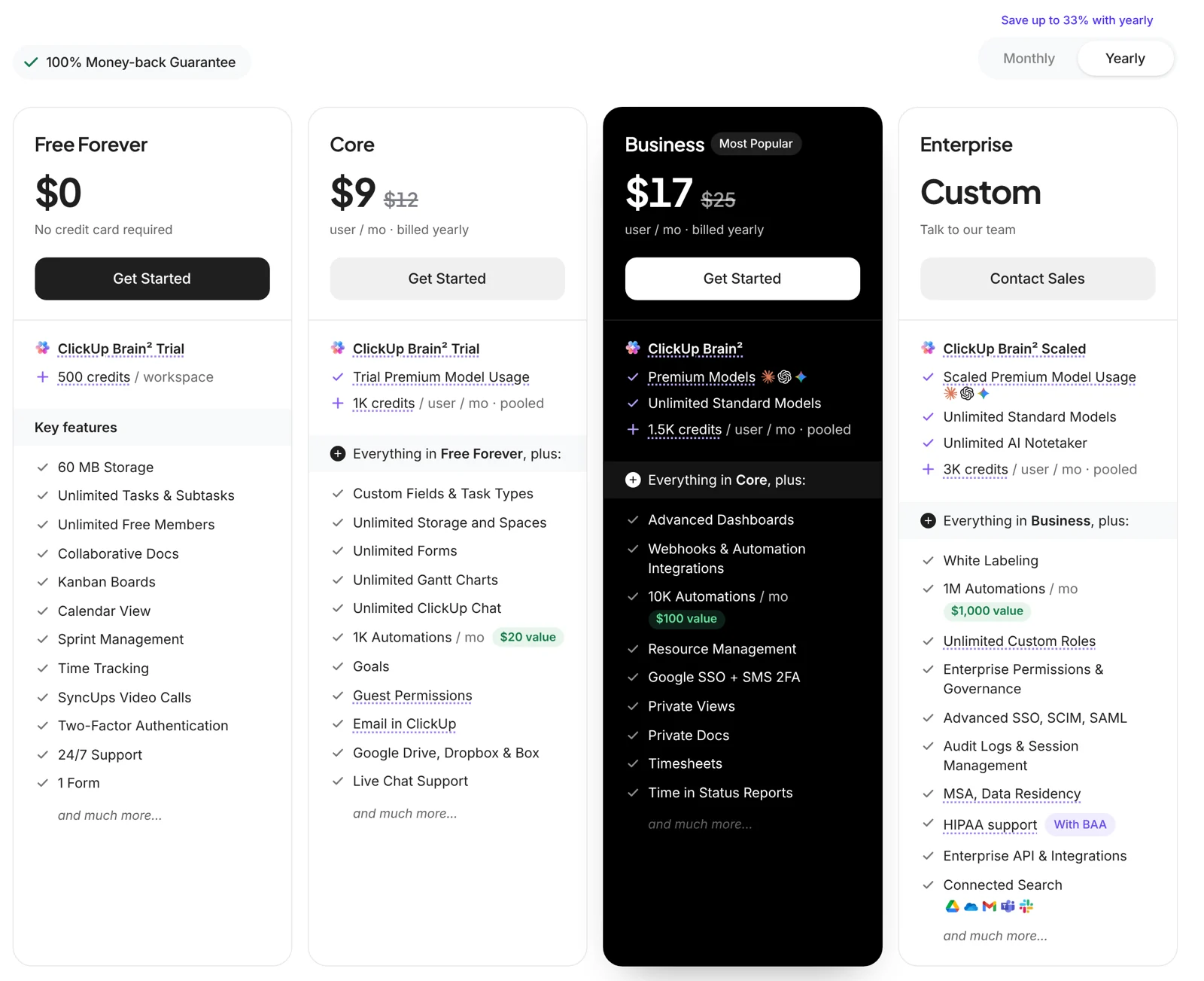
Prices have gone up, too. In April 2026, ClickUp’s help center listed Business at $12 per user a month, billed annually. If you’re still on an older plan, ClickUp says your price holds until the date in your notice. And changes start no earlier than January 2027.
Client access depends on guest seats
On paid plans, view-only guests are free and unlimited. But a client who comments or edits needs a guest seat. Core gives you 5 plus 2 per paid member (Business gives 10 plus 5). Go past that, and ClickUp adds a paid member seat.
What about speed and bugs?
Maybe you’re after a ClickUp alternative that’s faster or less buggy. We can’t test that fairly from the outside, so we haven’t scored it. If reliability worries you, check ClickUp’s public status page, which keeps a page for each incident.
Who should stay on ClickUp
Switching costs time, so stay put if any of these fit.
- Someone on your team enjoys building systems. ClickUp gives them 18 view types, custom fields and automations to work with.
- You want time tracking on a cheap plan. ClickUp’s timer comes on every plan, as a limited trial on Free Forever and in full from Core, at $9 per user a month billed yearly.
- You run more than client work. Docs, chat, whiteboards, goals and sprints live in one workspace, which suits agencies that also run internal projects.
- Your setup already works. If your team knows it and clients aren’t asking for more, a switch may cost more than it saves.
How we chose these ClickUp alternatives
We judged every tool on what it takes to run several SEO retainers, with extra weight on setup:
- Setup before the first client: How much do you design before work can start?
- One view across clients: Can you see every client’s work in one place?
- Repeat monthly work: Does each month’s work come back without rebuilding it?
- Client sign-off: Is there an approval step, and do clients need an account or a paid seat?
- What clients can see: Can clients follow progress without seeing your internal work?
- Cost with clients included: What does the plan with client access cost a team of 5 to 15?
- Getting your data across: Is there a ClickUp importer, or do you start from a CSV file?
Every fact below comes from each vendor’s own pricing page and help center. Prices were checked on November 14, 2026, and features on November 6, 2026, in US dollars. Where a tool prices differently by region, we say so. If you want more SEO-specific options, our best SEO project management software list goes wider.
ClickUp alternatives compared
| Tool | Best for | Standout feature for agencies | Starting price |
|---|---|---|---|
| OthFlow | SEO agencies that want retainers set up from day one | Preset SEO deliverables and stages, plus a login-free client portal | $79/month for up to 5 clients |
| Asana | Agencies that want a cleaner task tool with a client portal | Client Portal in Asana Client Management Advanced | Free for 2 users, then $10.99/user/month billed annually |
| Teamwork.com | Agencies that bill hours and run retainer budgets | Retainer budgets, free client users and a direct ClickUp importer | Free plan, then $9.99/user/month billed annually |
| Basecamp | Small agencies with a handful of clients | Client mode keeps every post private until you share it | Free plan, then $29/month flat |
| Productive | Agencies that run on hours, budgets and invoices | Retainer budgets that draft invoices automatically (Professional) | $10/user/month billed yearly |
| monday.com | Agencies that want to start from templates and boards | Unlimited free read-only viewers on paid plans | Free plan, then $9/seat/month billed annually |
| Notion | Small agencies that live in briefs, SOPs and wikis | Repeating database templates and free page-level guests | Free plan, then $10/member/month billed yearly |
| Wrike | Agencies with formal client approval rounds | Guest reviewers approve files without an account (Business) | Free plan, then $10/user/month billed annually |
| Trello | Teams of two or three that want to spend almost nothing | Free single-board guests on paid plans | Free plan, then $5/user/month billed annually |
Scroll sideways to see every column.
OthFlow: best for SEO agencies that want retainers set up from day one
First, a disclosure. OthFlow is our product, and we’ve judged it on the same criteria as the other eight, gaps included.
OthFlow is software for SEO agencies that run monthly retainers for several clients. We describe it as “Built by SEO specialists, for SEO agencies.” That means deliverable types, content stages and a monthly SEO plan for each client are already part of the product.
Best for
SEO and content agencies with up to 40 retainer clients, who’d rather run client work than design the system it runs on.
What it does well for agencies
Start with the client record, which keeps each client’s retainer, retainer cycles, onboarding, messages and mood together. Each month, you write that client’s SEO plan and move it from draft to sent to approved. That way, the client agrees to the month’s work before your team starts. Our retainer workflow software page shows the full monthly cycle.
Day-to-day work is organized as deliverables, and OthFlow ships with preset types for technical audits, backlinks, keyword research, on-page fixes, monthly content and client approvals. Each one gets an owner, a due date, a stage, notes and a working link.
Out of the box, a blog post moves from Brief through Outline, Writing, Editing, QA and Client Review to Published. Stages can differ by service, too. Our page on SEO project management software shows how that looks across a full client list.
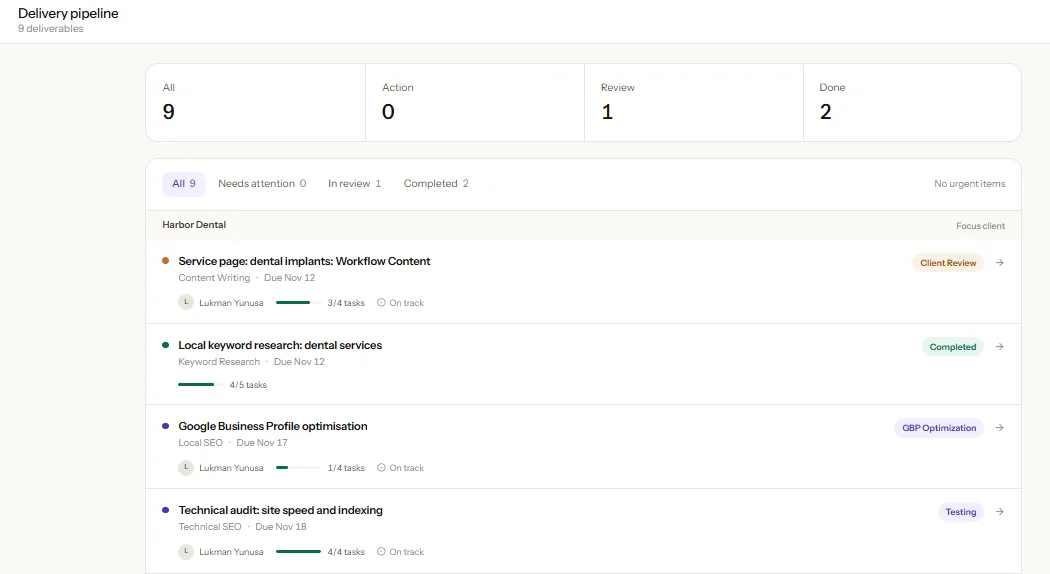
Clients don’t need a guest seat, because each one gets a private portal link with no login. In the portal, they can check progress, see approvals and invoices, read messages and find out what you need from them. They rate you from 1 to 10 each week and can print a progress report anytime.
Then there’s client health. Every client gets a 0 to 100 score from delivery, relationship and billing signals, with a trend and a watch list. Across all your clients, the agency dashboard puts portfolio health, late work, a priority queue and overdue invoices on one screen.

Billing handles retainer and recurring invoices, tracks payments and flags anything overdue. Each client also has its own task kanban, plus reusable onboarding checklists with steps for your team and steps for the client. You connect Search Console and GA4 once, and the reports sync daily with read-only access.
Limitations
- Time and margin: OthFlow has no timer and no profitability reports, so hourly-billing agencies need a separate time tool. Coming from ClickUp, it’s the gap you’ll notice first.
- AI: OthFlow doesn’t include any AI features.
- Connections: Only Search Console and GA4 connect, so Slack alerts and Zapier workflows are out.
- Sales and books: Leads and bookkeeping stay in your current tools, because OthFlow isn’t a CRM or an accounting package.
Pricing
- Starter: $79/month for up to 5 active clients
- Growth: $179/month for up to 15 active clients
- Agency: $349/month for up to 40 active clients
- More than 40 clients: talk to us and we’ll put together a plan around your client list and your team.
Every plan includes every feature and unlimited team members. Our pricing page counts an active client as one with an active retainer. Yearly billing gives you two months free, at $790, $1,790 or $3,490 a year.
How it compares to ClickUp
ClickUp charges for every member of your team, and you set up the agency side yourself. OthFlow charges per active client, so adding a freelance writer doesn’t change your bill. For a side-by-side look, read OthFlow vs ClickUp.
Asana: tidier task management, with a client portal on Advanced
Best for
Agencies that want a cleaner task tool than ClickUp and will pay for Advanced to get approvals and a client portal.
What it does well for agencies
There’s less to decide up front in Asana. Recurring tasks come on every plan, and from Starter you get custom templates and unlimited automations. On paid plans, guests are free, and a client only sees the tasks and projects you share with them.
If you need more structure for client work, there’s Asana Client Management, launched in September 2026. On its Advanced tier, a Client Portal lets clients create and complete tasks, download files, read status updates and comment, without taking a seat. Advanced also adds approval tasks (Approve, Request changes or Reject) and proofing on PDFs and images.
Limitations
- To get approval tasks, proofing or the built-in timer, you have to be on Advanced ($24.99 per user a month, billed annually).
- Client Management needs a Starter or Advanced base subscription, and Asana’s help center says it “is not included in these plans by default.” Ask what it adds.
- Timesheets and budgets come as an extra add-on, sold through Asana’s sales team with no public price.
- A 12-person team pays for 15 seats, because between 5 and 30 users Asana sells seats in steps of 5.
Pricing
Asana’s pricing page lists:
- Personal: free for up to 2 users
- Starter: $10.99/user/month billed annually ($13.49 monthly)
- Advanced: $24.99/user/month billed annually ($30.49 monthly)
- Enterprise: contact sales
Client Management lists the same per-user prices. Asana bills some countries in local currency, so these are its US prices.
How it compares to ClickUp
Asana guests are free and unlimited on paid plans. But ClickUp caps how many clients can comment or edit before it adds a paid seat. See OthFlow vs Asana, or our guide to the best Asana alternatives for SEO agencies.
Teamwork.com: retainers and free client users, with a ClickUp importer
Best for
Agencies that bill hours, run retainer budgets and want to bring their ClickUp projects across.
What it does well for agencies
Teamwork.com calls itself “the agency operations platform.” On Accelerate, a retainer budget resets monthly or quarterly. You choose whether unspent hours roll forward and whether overspent hours come off the next period.
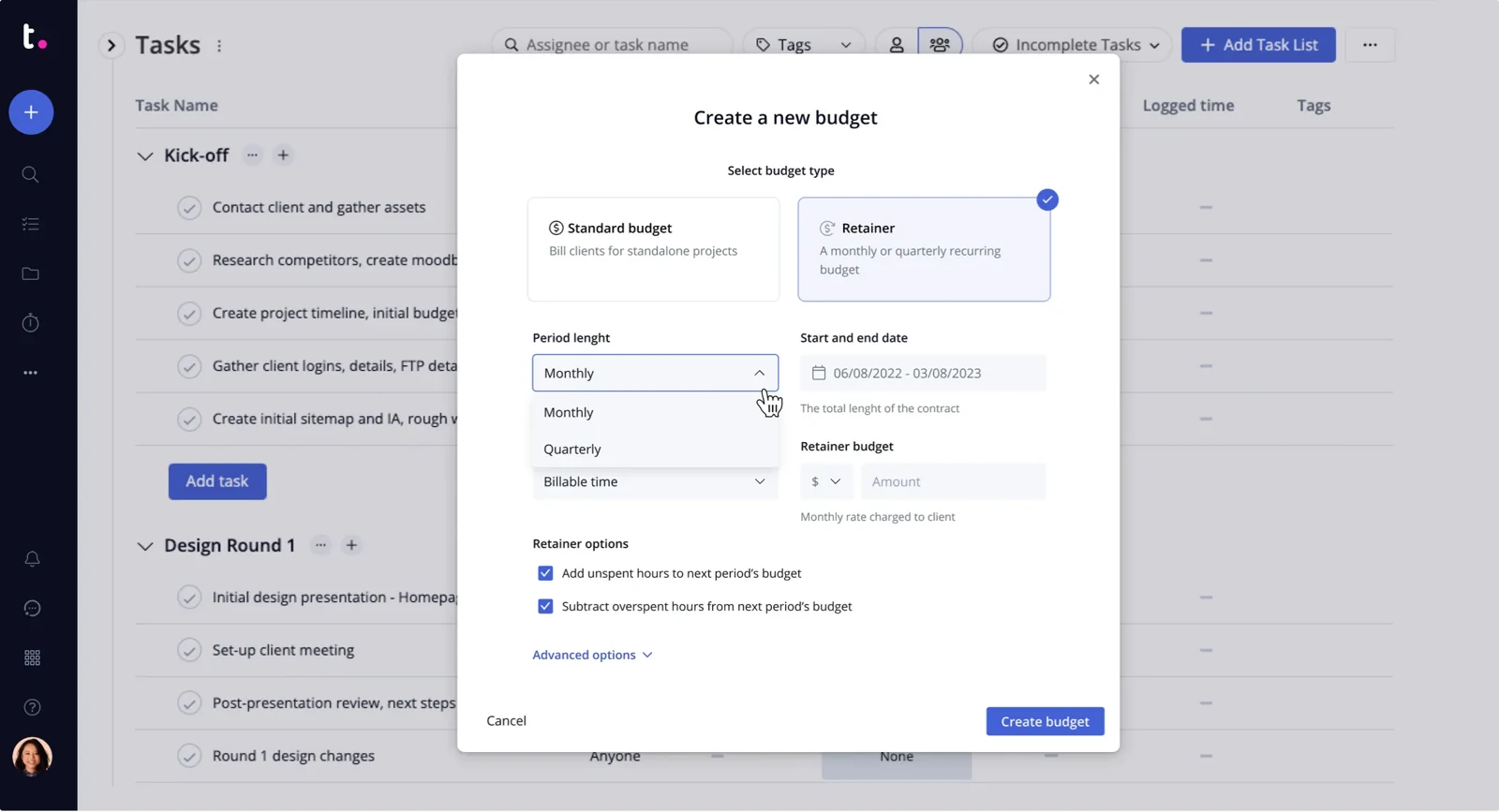
Client users are free from Basics up, and they can comment, upload files and create tasks in their projects. Proofs lets clients review and approve files from an email link, without an account. And Teamwork.com’s ClickUp importer works on every plan. It turns Folders into projects and Lists into task lists, with tasks, subtasks, checklists and comments.
Limitations
- Basics doesn’t include retainers, timesheets or invoicing. Those need Accelerate (5 users minimum), and profit by client needs Optimize, whose price isn’t public.
- A client user is capped at five active projects and can’t see the Reports area.
- The importer leaves out custom fields, attachments and folder statuses, and it skips Lists that aren’t inside a Folder.
- The agency page says it’s “for 50+ person agencies.”
Pricing
Teamwork.com’s pricing page lists:
- Free: $0 for up to 5 users and 5 projects, without client users
- Basics: $9.99/user/month billed annually ($13.99 monthly), minimum 3 users
- Accelerate: $24.99/user/month billed annually ($29.99 monthly), minimum 5 users
- Optimize and Enterprise: contact sales
How it compares to ClickUp
Basics costs about the same per user as ClickUp Core, but client users are free, so there’s no seat allowance to track. Weighing it against us? Read OthFlow vs Teamwork.
Basecamp: a calm home for client projects, with clients counted as users
Best for
Small agencies with a handful of clients who mostly need clear conversations and to-dos.
What it does well for agencies
Basecamp calls itself “the calm, organized way to manage projects, work with clients, and communicate company-wide.” From Pro up, every project gets the same tools, like a message board, to-dos, a card table (Basecamp’s kanban board), chat and files. So there are no Spaces or Folders to design.
In a client project, everything is private to your team by default. Each time you post, you choose whether the client sees it, and clients can comment and complete to-dos.
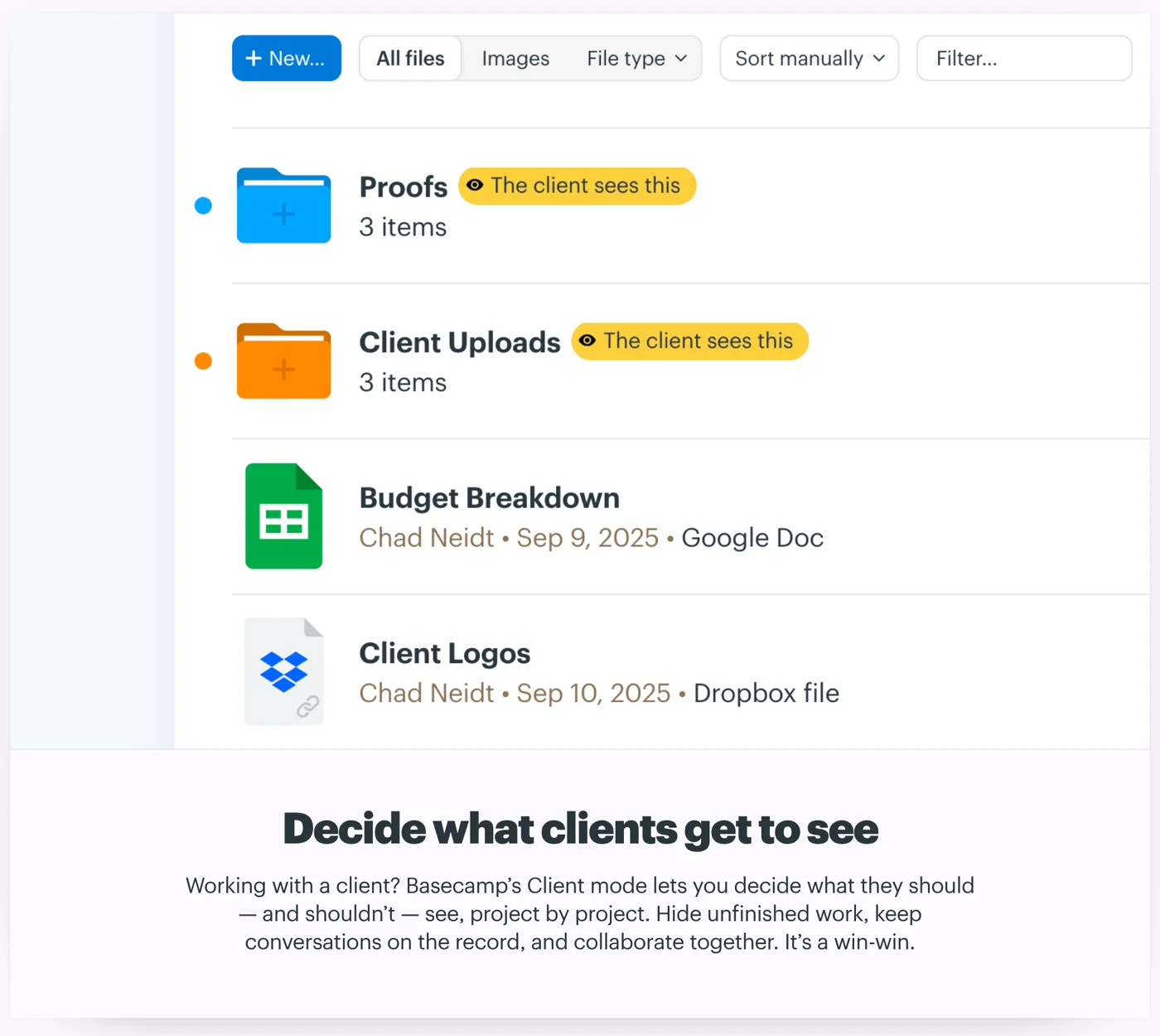
To-dos can repeat monthly, and from Pro, project templates use relative dates.
Limitations
- Every client you invite uses a user slot, so Pro’s 10 users and Pro Plus’s 15 fill up fast. Only Pro Unlimited lifts the cap.
- You won’t find an approval, proofing or client invoicing feature in Basecamp’s help docs.
- You can’t add time tracking below Pro Plus.
- ClickUp data can’t be imported directly.
Pricing
Basecamp’s pricing page lists flat prices with no per-user fees:
- Free: 1 project and up to 3 users
- Freelancer: $29/month for 3 active projects and 5 users
- Pro: $79/month for 8 active projects and 10 users
- Pro Plus: $99/month for 12 active projects and 15 users, with time tracking
- Pro Unlimited: $199/month billed annually or $329/month billed monthly, unlimited projects and users
Freelancer, Pro and Pro Plus are billed monthly only.
How it compares to ClickUp
Basecamp has far fewer features than ClickUp and almost nothing to set up. But since clients count as users, an agency with 10 or more clients will likely need Pro Unlimited. Comparing it with us? Read OthFlow vs Basecamp.
Productive: retainers, time and invoices in one place, if you track hours
Best for
Agencies that run on hours, budgets and invoices, and want the money side next to the project work.
What it does well for agencies
Productive is “purpose-built for agencies, consultancies, and other professional services businesses.” Time tracking, budgets and invoicing come on every plan. Clients are free to add, with no limit on how many.
On Professional, recurring budgets handle retainers, and Productive can draft an invoice automatically each time a new period starts. Client leads can also see the budget and approved time.
Limitations
- There’s no free plan, and every plan needs at least 3 paid seats.
- Productive doesn’t describe a proofing or deliverable approval feature. Its approvals cover time, expenses and time off.
- Repeating tasks and recurring budgets start on Professional, and rolling unused retainer hours forward needs Ultimate.
- There’s no ClickUp importer, so you’d move tasks by CSV (Professional and up) or ask about assisted migration.
Pricing
From Productive’s pricing page, per user, with a 3-seat minimum:
- Essential: $10/user/month billed yearly ($12 monthly)
- Professional: $25/user/month billed yearly ($29 monthly)
- Ultimate: contact sales
Productive shows euro prices in some European countries, so these are its US prices.
How it compares to ClickUp
Both track time, but only Productive turns that time and your retainers into client invoices.
monday.com: ready-made boards and templates, sold in seat buckets
Best for
Agencies that want to start from templates and visual boards, and don’t need time tracking below the Pro plan.
What it does well for agencies
With monday.com, you start closer to a working setup, because every plan comes with more than 200 templates.
Clients can follow along for free as viewers, who have read-only access and don’t count toward billing on paid plans. Clients who need to work on a board join as guests from Standard up, where every 4 guests count as 1 billed seat. On Pro, guests are unlimited.
Limitations
- Seats come in buckets that start at 3, so a team of 6 pays for 10.
- By default, a guest can create items, edit columns and even add automations on their boards.
- Standard includes 250 automation actions a month, which monday.com’s help center says is “typically exhausted within days” for accounts that notify several people.
- Time tracking starts on Pro, and there’s no native approval or proofing feature.
Pricing
monday.com’s pricing page lists per-seat prices, with a 3-seat minimum on paid plans:
- Free: $0 for up to 2 seats
- Basic: $9/seat/month billed annually ($12 monthly)
- Standard: $12/seat/month billed annually ($14 monthly)
- Pro: $19/seat/month billed annually ($24 monthly)
- Enterprise: custom pricing
monday.com says the price “is determined by the user’s billing country,” so these are its US prices. The yearly Standard and Pro prices are currently a “special offer,” so they may rise.
How it compares to ClickUp
monday.com gives clients free read-only access, much like ClickUp’s view-only guests, but you’ll need Pro for time tracking. See OthFlow vs monday.com. Weighing monday.com itself? Our list of the best monday.com alternatives for SEO agencies covers where it falls short.
Notion: docs and tasks together, with fewer layers to set up
Best for
Small agencies that live in briefs, SOPs and wikis and want light task tracking next to them.
What it does well for agencies
Like ClickUp, Notion keeps docs and tasks together, but it’s built from pages and databases. For example, a content calendar is a database, and each row is a page where the brief, draft and comments live together. You can view it as a board, a timeline or a calendar.
For recurring work, repeating database templates create a fresh copy daily, weekly, monthly or yearly.
Guests are free, but they only see the pages you invite them to. Notion’s agency guide suggests building each client a portal page.
Limitations
- Notion’s site doesn’t describe time tracking, invoicing or proofing, and its agency guide suggests clients approve drafts with a comment.
- Database automations need a paid plan, and AI beyond a limited trial needs Business.
- Notion doesn’t document a ClickUp importer, so you’d bring tasks in by CSV.
Pricing
From Notion’s pricing page, per member, in US dollars:
- Free: $0, with 10 guests
- Plus: $10/member/month billed yearly ($12 monthly)
- Business: $20/member/month billed yearly ($24 monthly), with Notion AI
- Enterprise: custom pricing
How it compares to ClickUp
Notion has fewer layers to plan. But ClickUp has more built in for client work, like native time tracking and proofing on Business.
Wrike: formal client approvals, with yearly billing only
Best for
Agencies whose clients sign off on files through formal approval rounds, and that are happy to pay yearly.
What it does well for agencies
On Business, clients can review files as guest reviewers, without a Wrike account. They comment, make a decision and get replies by email, and they only see the files in approvals assigned to them.
Clients who just follow along can be Viewers, a free license for viewing and commenting. On Business, you can also share a dashboard through a public link, with an optional password and expiry date. Blueprints, Wrike’s reusable templates, start each client’s month from the same setup.
Limitations
- Guest reviewers, public dashboards and blueprints need Business, at $25 per user a month, and so do approvals, proofing and time tracking.
- You can’t pay monthly for Business or anything above it.
- Accounts up to 30 seats buy in groups of five, so a team of 7 pays for 10.
- Budgeting is a Pinnacle feature, and Pinnacle’s price isn’t published.
- Wrike recommends a consultant during onboarding and requires a guided deployment for teams of 20 or more.
- There’s no self-serve ClickUp importer, though Wrike’s ClickUp comparison page offers “dedicated migration support.”
Pricing
Wrike’s pricing page shows per-user prices billed annually, in US dollars:
- Free: $0
- Team: $10/user/month for 2 to 15 users
- Business: $25/user/month for 5 to 200 users
- Pinnacle and Apex: contact sales
How it compares to ClickUp
Wrike Business costs $8 more per user a month than ClickUp Business. In return, clients approve files and open dashboards without an account.
Trello: one board per client and very little to set up
Best for
Teams of two or three that want each client on one simple board and to spend almost nothing.
What it does well for agencies
Trello is built from boards, lists and cards, so there’s very little to design. You give each client a board and drag cards across it as the work goes from to-do to done. Single-board guests are free, so a client invited to their own board doesn’t add to your bill.
Automation is built into every board. For recurring retainer tasks, Trello’s own Card Repeater Power-Up copies a card every week, month or year. On Premium, clients can be Observers, who view, comment and vote on cards but can’t move or edit them.
Limitations
- Anything on a client’s board is visible to that client. Trello’s help center says “there isn’t a way to prevent someone from seeing specific cards on a board.”
- Invite a client to a second board and they stop being free, because Standard and Premium bill multi-board guests as members.
- For time tracking or client sign-off, you’d add a third-party Power-Up, and some charge their own fee.
- Coming from ClickUp, you’d rebuild boards by copy-paste or through the API, since Trello doesn’t have a generic import tool.
Pricing
Trello’s pricing page lists:
- Free: $0 for up to 10 collaborators per Workspace, guests included
- Standard: $5/user/month billed annually ($6 monthly)
- Premium: $10/user/month billed annually ($12.50 monthly)
- Enterprise: $17.50/user/month billed annually
How it compares to ClickUp
Trello Standard costs $4 less per user a month than ClickUp Core, with far less to configure. But ClickUp tracks time and lets you share only the Lists a client needs, while Trello shows guests the whole board. Comparing it with us? Read OthFlow vs Trello.
How to choose a ClickUp alternative by situation
Start with how you bill, how many clients you run and what they need to see:
- You run 5 to 40 SEO retainers and want clients in a portal without logins: OthFlow, from $79 a month with unlimited team members.
- You like ClickUp’s approach but want less to set up: Asana, with approvals and the client portal on Advanced.
- You bill by the hour and need retainer budgets: Teamwork.com from Accelerate, or Productive from Professional.
- You have a handful of clients and mostly need clear communication: Basecamp, as long as your clients and team fit your plan’s user limit.
- Your agency runs on briefs, SOPs and wikis: Notion.
- Your clients sign off on a lot of files: Wrike Business, where they approve without an account.
- You’re a team of two or three with almost no budget: Trello Standard, or ClickUp’s own Free Forever plan.
- Your agency already lives in Microsoft 365: look at Microsoft Planner first (see the FAQs).
Before you switch, get your data out of ClickUp
Start with the export, because ClickUp’s export has a few limits. Its Workspace export puts task data from the Spaces, Folders and Lists you choose into a CSV file. On most plans, only owners and admins can run it, and the download link expires after an hour.
The export’s field list doesn’t mention custom fields, so export a List view too if you rely on them. And Docs can’t be exported in bulk, so save your SOPs and briefs one at a time.
Then run one typical client in the new tool for a full month before you move everyone else.
FAQs
What are some good Microsoft alternatives to ClickUp?
Microsoft Planner is the closest Microsoft alternative to ClickUp, and you may already have it. Basic Planner is included in Microsoft 365 Business Basic, Standard and Premium, at $7, $14 and $22 per user a month paid yearly. It gives you Grid, Board, Schedule and Charts views.
Planner Plan 1 ($10 per user a month, paid yearly) adds timelines, sprints, goals and task dependencies. Planner and Project Plan 3 ($30) adds portfolios, baselines and critical path.
If you invite clients, Planner guests join through Microsoft 365 Groups and can create and delete tasks, so keep internal plans separate. Microsoft also prices by country, and its UK page lists Planner Plan 1 at £7.70 a month excluding VAT.
Is ClickUp really that good?
Yes, ClickUp is a strong tool for teams that want one flexible workspace and have time to set it up. Its Free Forever plan alone includes unlimited tasks and members, docs and sprints, plus a limited trial of time tracking.
For an agency, though, you’ll hit the free plan’s limits fast. It allows 5 Spaces, 60 MB of storage and 100 automation actions a month. And free-plan guests always get full edit rights. So for agency work, the fair comparison is Core at $9 or Business at $17 per user a month.
Is there anything better than ClickUp?
For SEO agencies running retainers, yes. A tool built for client work, like OthFlow (our product), Teamwork.com or Productive, saves you the setup. But if you want one cheap workspace for client work, internal projects, docs and chat, ClickUp is hard to beat.
Is Todoist or ClickUp better?
Todoist is better for personal and small-team to-do lists, and ClickUp is better for running projects. Todoist calls itself a to-do list app. Its Business plan adds a shared team workspace, with up to 500 team projects. ClickUp also has docs, dashboards, Gantt charts, sprints and time tracking, which is what client projects need.
Which ClickUp alternative should your agency pick?
ClickUp gives you a huge set of parts, and if someone on your team enjoys building with them, it’s still a reasonable home.
But if you’d rather start with SEO retainers, a client portal, client health and invoices already in place, OthFlow was built for exactly that. If you bill by the hour, look at Teamwork.com or Productive first. And for something calmer with very little setup, try Basecamp or Trello. Our comparisons page puts OthFlow side by side with each of the main options.
Want to see how your retainers would look in OthFlow before you rebuild anything?

Written by
Founder of OthFlow
Tim is the founder of OthFlow. He’s worked in SEO for seven years and has helped more than 50 businesses grow their pipeline and hit their goals through SEO and AI search.
Connect on LinkedIn